I wanted more control over my home network, but I still needed the ISP-provided router for the DSL connection.
The idea was to make the ISP-provided modem/router behave as close to a dumb DSL modem as its stock firmware allows. It would stay on the DSL side, while a separate router handled the actual routing and the entire home network. This is mainly useful for power users who want the extra control of their own router.
VPN routing is one example. Many ISP-provided routers can run a VPN server, such as a WireGuard server, so you can connect to your home network from outside. But they often cannot act as a VPN client or let you set up different outbound VPN tunnels for selected devices. A more capable separate router gives you that flexibility.
In my case, that means a 1&1 DSL connection, a 1&1-provided FRITZ!Box 7530, and a GL.iNet Flint 2. I wanted the Flint to be the real router for the home network, with the FRITZ!Box acting only as the DSL front-end as far as possible.
The target was:
DSL
 │
 ▼
FRITZ!Box 7530
 │
 │ PPPoE passthrough
 ▼
Flint 2
 │
 ▼
Home network
I specifically wanted to avoid:
Internet → FRITZ!Box NAT → Flint NAT → devicesThere is one complication: the FRITZ!Box 7530 does not provide a normal bridge/modem mode on current stock FRITZ!OS. The practical alternative is PPPoE Passthrough.
At first, I thought enabling that option would be the whole setup. It was not quite that simple.
This setup was done with the FRITZ!Box running the latest FRITZ!OS and already working normally with 1&1, and the Flint 2 running the latest stable GL.iNet firmware.
Starting from a working 1&1 configuration
After a factory reset, the 1&1 FRITZ!Box configured itself automatically.
Under:
Internet → Account Information → Internet Connection
the provider was already set to 1&1 Telecom GmbH, with the Internet credentials provisioned by 1&1.
I left all of that alone.
This turned out to be important. Some guides suggest selecting another provider, entering fake credentials into the FRITZ!Box, or changing it to Internet access via LAN. None of those are needed here.
The FRITZ!Box should continue using its own DSL modem and its normal 1&1 configuration.
The only change needed there was under Connection Settings:
Connected network devices are also allowed to establish their own Internet connections
This enables PPPoE passthrough.
The FRITZ!Box itself remains online, but a router connected to one of its LAN ports can now establish a separate PPPoE session through the DSL line.
Connecting the Flint 2
I connected the LAN 1 port on the FRITZ!Box directly to the WAN port on the Flint 2:
FRITZ!Box LAN 1 → Flint 2 WAN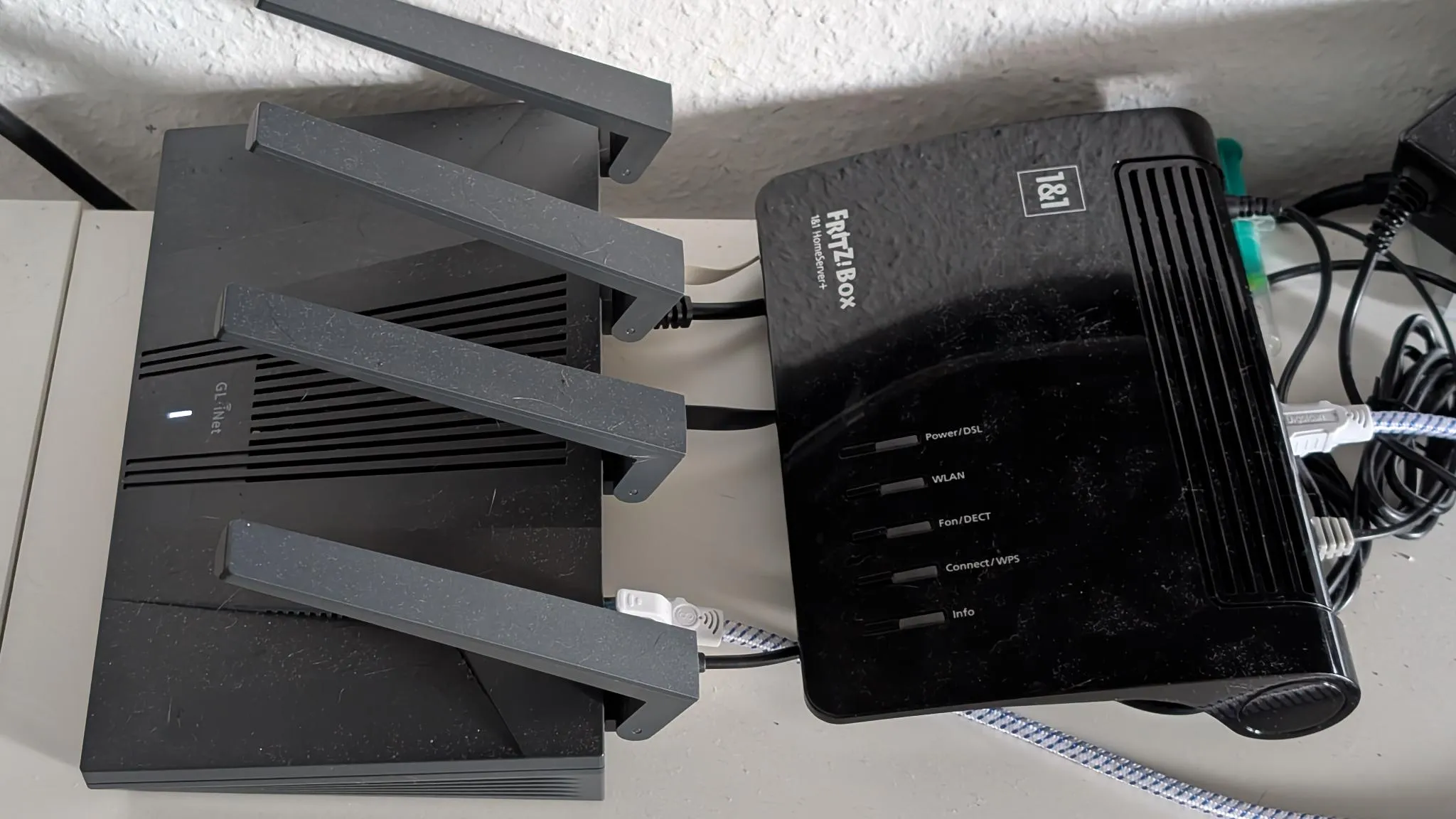
The FRITZ!Box 7530 and Flint 2 connected by Ethernet
Initially the Flint received a normal DHCP address from the FRITZ!Box:
192.168.178.xThat was useful as a quick check that the Ethernet path was fine.
Then under the Flint’s Ethernet WAN settings I changed the protocol from DHCP to PPPoE and entered the complete 1&1 Internet username and password.
The username has the usual 1&1 form:
1und1/<identifier>@online.deNo VLAN ID was necessary on the Flint. The FRITZ!Box is still handling the DSL side of the connection.
At this point PPPoE authentication succeeded, but the connection still did not become properly usable.
That was the confusing part: the login worked, the connection looked active, and the Internet still did not work properly.
1&1 and DS-Lite
My 1&1 connection uses DS-Lite.
The FRITZ!Box event log made that visible with an AFTR gateway from online.versatel.de.
This means there is no normal native IPv4 connection for the Flint to receive. The connection is essentially:
Native IPv6
     │
     └── DS-Lite tunnel → IPv4 Internet
The first problem was that IPv6 was disabled by default on the Flint.
Under:
Network → IPv6
I enabled IPv6 and selected:
Native
After that, PPPoE stayed connected and the Flint received both an IPv6 address and a delegated IPv6 prefix from 1&1.
IPv4 still did not work, though.
The missing DS-Lite package
The stable GL.iNet firmware did not have OpenWrt’s ds-lite package installed.
From SSH:
opkg update
opkg install ds-lite
The package adds the DS-Lite protocol handler, but installing it alone was not enough because the network service had already been running.
I restarted networking:
/etc/init.d/network restartAfter that, OpenWrt recognized the new dslite protocol.
A fresh DHCPv6 negotiation then automatically created a dynamic interface called:
wan6_4Checking it showed:
proto: dslite
l3_device: ds-wan6_4
up: true
The tunnel itself looked like:
ds-wan6_4@pppoe-wanAt that point IPv4 traffic from devices behind the Flint started working as well.
The final topology
The result is slightly different from a traditional bridged modem setup:
                    1&1
                     │
                DSL / PPPoE
                     │
              ┌──────┴──────┐
              │ FRITZ!Box   │
              │     7530    │
              └──────┬──────┘
                     │ PPPoE passthrough
                     │
              ┌──────▼──────┐
              │   Flint 2   │
              │   PPPoE     │
              │ IPv6 +      │
              │  DS-Lite    │
              └──────┬──────┘
                     │
                 Home LAN
The FRITZ!Box still has its own Internet session, so technically it has not become a dumb modem.
But none of my normal devices use that routed network.
I disabled the FRITZ!Box Wi-Fi and left only the Flint connected to it. All home devices connect to the Flint instead.
For those devices there is therefore no:
FRITZ!Box NAT → Flint NATThe Flint establishes PPPoE itself and is the actual router for the home network.
One misleading warning
The GL.iNet UI still reports:
The interface is connected, but the Internet can’t be accessed with IPv4 protocol.
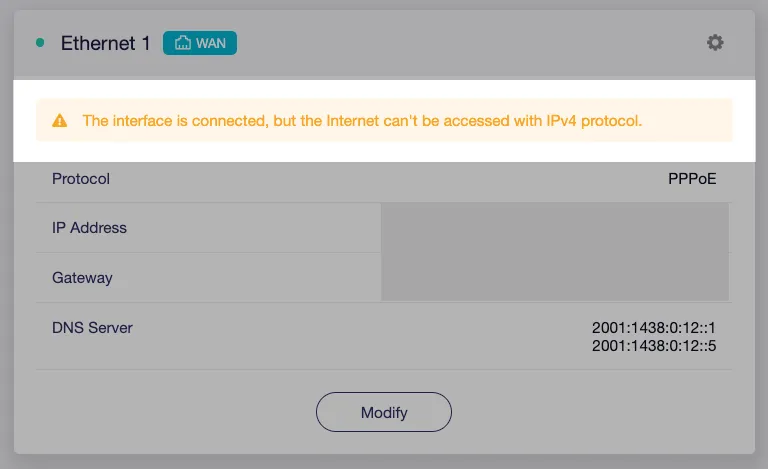
That warning is misleading in this configuration.
The main PPPoE interface genuinely has no native IPv4 address. IPv4 is provided through the dynamically created DS-Lite interface instead, and the GL.iNet dashboard does not appear to account for that properly.
Testing from a device behind the Flint confirmed both IPv4 connectivity and normal Internet access.
So the warning can remain even though the underlying OpenWrt networking is working correctly.
The main lesson from this setup was that PPPoE passthrough itself was the easy part. I spent more time wondering why a successfully connected router still had no usable IPv4.
The less obvious requirement was keeping native IPv6 enabled and adding DS-Lite support on the Flint. Once those pieces were in place, the FRITZ!Box could stay on the DSL side while the Flint became the router that actually matters for my home network.