I have a confession. Whenever macOS complains about disk space, Docker is guilty until proven innocent. My usual response is to delete a few images first and ask questions later.
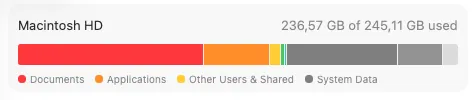
A macOS update complained that the disk was full. At that point, less than 1 GB was available. I deleted several ISO files from Downloads to regain some working space, then opened the Storage screen and found something odd: Documents was using more than 100 GB, while my actual Documents folder was only around 12 GB.
Even with that suspicious number in front of me, I followed my usual ritual and removed a few Docker images. It barely changed anything. Only then did I stop guessing and start investigating.
This Mac is also used for Docker, Ollama, and local Hugging Face models. All of them can store large amounts of data outside the folders visible in Finder. I wanted to identify what was actually using the disk, recover space without removing useful project data, and configure storage budgets where possible to reduce the chance of the same problem returning.
Instead of continuing with random deletions, I compared the filesystem, hidden home directories, and the storage views provided by the individual tools.
Finding the missing space
I started with the real data volume and the largest home directories:
df -h /System/Volumes/Data
du -x -d 1 -h "$HOME" 2>/dev/null | sort -h
The useful part of the result was:
Colima virtual disks     64 GB
General caches           29 GB
Local AI models          18 GB
Actual Documents         12 GB
The Documents label in macOS is a category, not a direct measurement of the Documents folder. Hidden files in the home directory can appear there or under System Data.
The actual Docker problem
I use Colima for Docker. Its virtual disk was using around 64 GB, although the visible images accounted for only a small part of that.
The missing part was BuildKit cache:
docker system df -v
docker builder prune
The prune released nearly 44 GB. Repeated multi-stage builds had accumulated intermediate layers, build contexts, dependency layers, and package-manager cache mounts. These caches make later builds faster, but they can grow quietly.
There were also two storage layers involved:
Docker frees blocks inside the Linux VM
                    ↓
Colima returns unused VM blocks to macOS
Pruning Docker was therefore not enough. My Colima profile was also marked as broken, so I repaired it and trimmed the virtual disk:
colima stop --force
colima start
colima ssh -- sudo fstrim -av
The physical Colima directory dropped from around 64 GB to 13 GB. Containers, images, and named volumes remained intact.

Preventing the cache from growing again
My Colima configuration had no explicit BuildKit cache budget. The default profile configuration is stored at:
~/.colima/default/colima.yamlI replaced the empty docker: {} setting in that file with:
docker:
  builder:
    gc:
      enabled: true
      defaultKeepStorage: "8GB"
This is a garbage-collection target rather than a strict cap. It is enough to keep useful cache without allowing it to dominate a relatively small SSD. Docker documents the available policies in its Build garbage collection guide.
The existing Colima disk still has a larger logical maximum because virtual disks cannot be shrunk in place. I left it alone. It is sparse, so the maximum does not consume physical space, and recreating it would remove the Docker volumes stored inside it.
The runbook for next time
This is the sequence I will use when macOS reports low disk space again.
1. Check physical free space
diskutil info /System/Volumes/Data | grep "Container Free Space"This is more reliable immediately after a large cleanup than the Storage graph, which can take time to recalculate.
2. Find large hidden directories
du -x -d 1 -h "$HOME" 2>/dev/null | sort -h
du -sh ~/.colima ~/.cache ~/.ollama
3. Inspect Docker before deleting images
docker system df -v
docker buildx du
If build cache is the problem:
docker builder prune --filter "until=168h" --keep-storage 8GB
colima ssh -- sudo fstrim -av
4. Check downloaded model caches
uvx --from huggingface-hub hf cache ls
ollama ls
These models can be much larger than the applications that use them. I removed only the ones I no longer needed.
Takeaway
I should not have started by deleting Docker images I still wanted. The Storage screen sent me looking in the wrong place, and image size was not the same as Docker’s total disk usage.
Next time I will start with du, check BuildKit and the model caches, and verify the result with diskutil. That is the reason for keeping the runbook here.